Part 2 - CosmosDB Logical Partitions and the Impact on Partition Key Choice
Choosing the right partition key in Cosmos DB. A real-world IoT streaming scenario analyzing different partition key strategies.
In the first part of this series, I was explaining Physical Partitions, the theoretical maximum, and the reason to create one or more partitions. I also explained the RUs distribution and some metrics.
In this post the focus will be on Logical Partitions. Again I will try to explain typical questions that I receive:
- What is a Logical Partition?
- What is a partition Key?
- What is the Max Size?
- What is the impact on Physical Partitions?
To explain the Logical partition, I will take as example a real-time streaming scenario.
Scenario
Suppose an energy company (Oil and Gas) has millions of sensors streaming data to Data Loggers (local), and then those data loggers placed in different geographical locations stream that data to a centralized Kafka or IoT Hub. Then there is a service listening to Kafka or IoT Hub that processes that data and finally stores it in CosmosDB.
Each message in Kafka or IoT Hub will be in JSON format with the following structure:
| Name | Description |
|---|---|
| DeviceId | Sensor or Device ID |
| DeviceName | Sensor or Device Name |
| DataLoggerID | Data Logger transmitting the data |
| Plant ID | Plant where the Datalogger is connected |
| Plant Name | Friendly name of the Plant |
| Time | UTC time in which the telemetry was generated in ISO 8601 format |
| Ticks | Ticks in which the telemetry was generated |
| Epoch | Time in which the telemetry was generated in epoch format (seconds) |
| Location Array | Latitude, Longitude and Accuracy |
| Device Data | Type, measure unit, measure value |
JSON Example:
{
    "deviceId": "a7d96e7e-16ae-400e-a616-e84dba0d8633",
    "deviceName": "TEMP-ALBA-01",
    "dataLoggerId": "0f472328-7214-4bbd-9789-50519f44bb23",
    "plantId": "PLANT-1",
    "plant name": "North-Alba-01",
    "time": "2022-07-19T10:10:11.5091350Z",
    "ticks": 637097550115091350,
    "epoch": 1658251025,
    "device-data": {
        "type": "temp-sensor",
        "measure-unit-description": "degrees celsius",
        "measure-unit": "C",
        "measure-value": 21
    },
    "location": {
        "latitude": "35.063375",
        "accuracy": "0.0",
        "longitude": "-89.963738"
    }
}
The expected messages per second will be around 10,000 and the message size will vary between 1 to 2 KB.
The data must live in Cosmos DB for 30 days (TTL: 30 days).
Based on the message size, the total storage estimation in Cosmos DB will be:
- ~70 GB per day
- ~2 TB per month
What is a Logical Partition?
By definition, a logical partition consists of a set of items that have the same partition key.
The Max Size for a Logical partition is currently 20 GB (This value may change in the future).
What is a partition key?
By definition, a partition key has two components: partition key path and the partition key value.
Basically, the partition key is a property in our JSON document. The partition key path accepts alphanumeric and underscore (_) characters. You can also use nested objects by using the standard path notation (/). The partition key value can be of string or numeric types.
How can we decide the Partition Key in our scenario?
There is a lot of very useful documentation about the partition key election (I will put the links at the end) but in this post I will try to discuss the election based on some real examples.
In our scenario, writes will be critical due to data loggers streaming data from many sensors very frequently, so this is clearly a heavy write scenario. Suppose also that this energy company has 15 plants, and one is responsible for 25% of the total traffic generated.
Also, there is an application consuming the data from Cosmos DB. This application allows operations to see the sensor information in near real time as well as throw alerts when something is not normal. The application also allows filtering by plant, by data logger, and by sensors.
Alternative 1: plantId as Partition Key
Suppose that we decide the plantId property as the Partition key candidate:
"deviceId": "a7d96e7e-16ae-400e-a616-e84dba0d8633",
"deviceName": "TEMP-ALBA-01",
"dataLoggerId": "0f472328-7214-4bbd-9789-50519f44bb23",
"plantId": "PLANT-1",
Advantages of using plantId as partition key:
- All the Plant data will be in the same Logical Partition, and we will avoid cross partition queries.
Problems deciding plantId as partition key:
- First and most obvious issue is the maximum number of Logical Partitions. If there are just 15 Plants, there will be only 15 partitions.
- Second, the total maximum size of each Logical partition is 20 GB, this implies the maximum size will be 15 partitions × 20 GB = 300 GB vs 2 TB that we estimated to store for 30 days.
Conclusion: PlantId is not a good choice for Partition Key evaluating our conditions.
Alternative 2: plantId + CurrentDate (Composite Partition Key)
Suppose that we decide the plantId + CurrentDate as the Partition key candidate.
In this scenario, we can create a new field which contains the combination of the PlantID + the current day:
"deviceId": "a7d96e7e-16ae-400e-a616-e84dba0d8633",
"deviceName": "TEMP-ALBA-01",
"dataLoggerId": "0f472328-7214-4bbd-9789-50519f44bb23",
"plantId": "PLANT-1",
"partitionKey": "PLANT-1-20220819"
In this case we are still grouping by Plant ID and we can query all the records by the current day or the days before, which is beneficial to avoid cross partition queries.
Let’s check the size… Based on the scenario: Storage size per day 70 GB and one plant generates the 25% of the total traffic, it means that only one plant will generate 17.5 GB of data.
Since 17.5 GB < 20 GB we won’t have sizing issues on the logical partition size, but… let’s review what will be the Physical partition behavior.
Why is the impact on Physical Partitions?
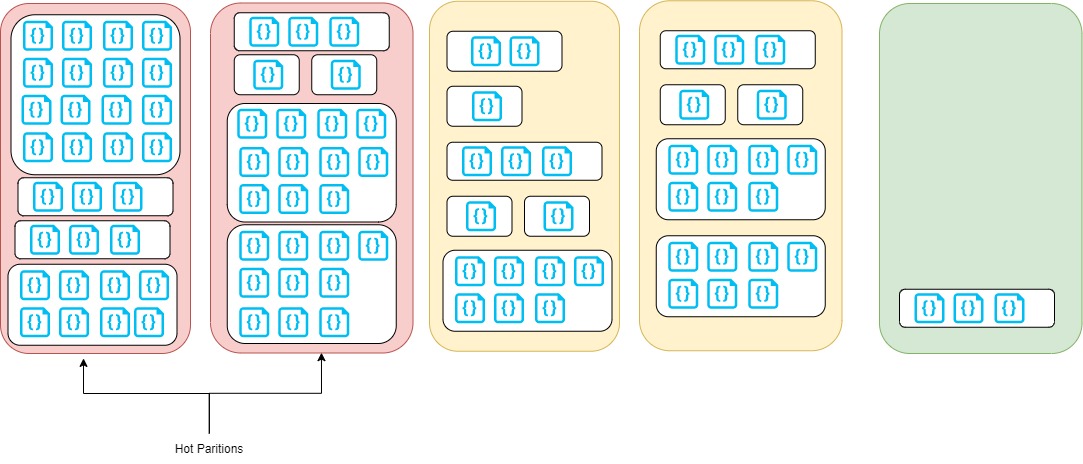
The image shows that two Physical Partitions are in red — completely full — and some big logical partitions. If we continue adding data into that logical partition, the Cosmos DB engine will have to move some logical partitions to other physical partitions with more space to release space on the partition where we try to add data.
This situation is called Hot Partition and it can be observed on insights metrics for Cosmos DB:
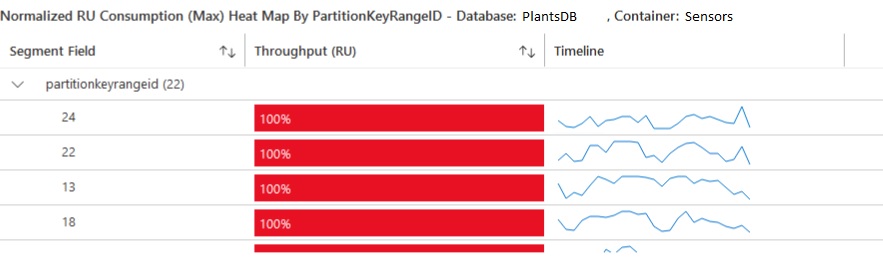

Conclusion: PlantId + CurrentDate is a better choice for Partition Key but it is not ideal.
How do we know the partition key size?
There is a log analytics query provided by Microsoft that can be used to check the Partition Key Size:
AzureDiagnostics
| where Category == "PartitionKeyStatistics"
//| where collectionName_s == "CollectionToAnalyze"
| summarize arg_max(TimeGenerated, *) by databaseName_s, collectionName_s, partitionKey_s, _ResourceId
| extend utilizationOf20GBLogicalPartition = sizeKb_d / 20000000
| project TimeGenerated, databaseName_s, collectionName_s, partitionKey_s, sizeKb_d, utilizationOf20GBLogicalPartition, _ResourceId
The output:

sizeKb_d shows the total size of the Logical Partition — the bigger in our case is 6.26 GB. utilizationOf20GBLogicalPartition shows the % of the total utilization, in our case is 0.3 ~ 30%.
What is the right partition key in this case?
In my opinion, due to this being a heavy write scenario, I would prefer fast insertion, so the partition key must generate smaller logical partitions.
A UUID different on any record or a more specialized combined key, like PlantID + EPOCH.
Also, for heavy write partitions it is recommended to define custom indexes instead of indexing everything.